In today’s digital age, a strong LinkedIn profile is more than just an online resume, it’s a powerful tool for building professional relationships and attracting new clients. For photographers, standing out in a competitive market means connecting with the right people in the right way. But with so many ways to present your work and showcase your skills, it can be tricky to know what to focus on.
This guide combines expert insights and platform strategies to help you: - Build a standout profile - Post content that gets attention - Connect with the right clients - Use the platform like a creative pro
LinkedIn was created with a clear purpose, to connect professionals and help them succeed. What began as a small networking idea in 2003 has grown into the world’s leading professional platform, now used globally by people who hire, commission, and collaborate.
For photographers, this makes LinkedIn very different from platforms that focus mainly on visuals. It is where art buyers look for talent, where creative directors research potential collaborators, where producers check someone’s professionalism, and where brands share the work they want to create next. In many cases, commercial projects begin on LinkedIn long before a brief is sent out.
Whether you shoot people, food, fashion, automotive, or advertising campaigns, LinkedIn gives you access to the global creative workforce in one place. It allows you to build credibility, stay visible, and connect with the people who actually commission photography.
LinkedIn is not about going viral, it is about being findable, credible, and easy to understand for the people who commission work.
Types of LinkedIn Posts
LinkedIn allows several ways to share your content: posts, articles, reposts, and newsletters. For photographers, posts are the most common way to share quick updates and showcase your work. You can also share articles for in-depth insights, reposts to engage with others' content, and newsletters for regular updates. But to stand out, consider varying the types of posts you share:
1. Video Posts:
- Videos are powerful tools for engagement. Posting behind-the-scenes videos or showing your creative process can help potential clients see what goes into a shoot. A quick behind-the-scenes video of you setting up a shot, for instance, can build a deeper connection with your audience.
2. Article Posts:
- Share in-depth insights about your work, creative process, or industry trends. Articles allow you to showcase your expertise and engage with your network in a more professional and educational way. For example, a post on "how to choose the right location for a shoot" could position you as a thought leader in your niche.
3. Reposts:
- Engaging with others’ content by reposting helps you build relationships with peers in your industry. It’s a great way to stay visible and show that you’re active in the community.
4. Newsletters:
- If you have regular updates or projects to showcase, LinkedIn newsletters can keep your followers engaged with your ongoing work, upcoming projects, or industry insights.
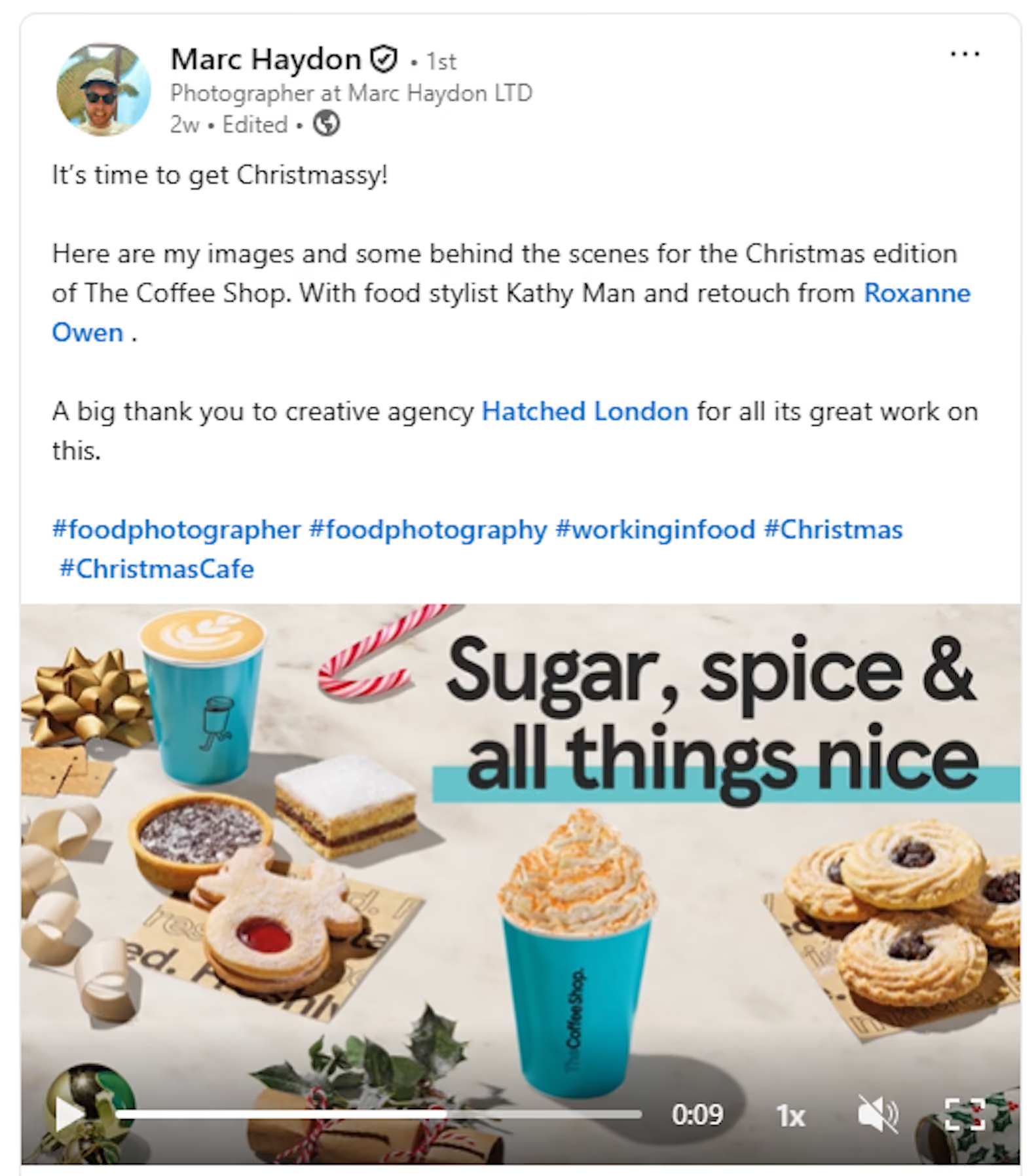
Choosing the Right Photos for LinkedIn Posts
While LinkedIn allows you to upload up to 20 images per post, it’s best to keep your visuals focused and avoid clutter. Too many photos can overwhelm your audience, so choose a handful of images that complement your message and engage viewers. Around 1 to 5 images is an ideal range, whether you're sharing short announcements, event highlights, behind-the-scenes moments, or telling a deeper story. These can include:
- New projects or shoots you’re working on.
- Event highlights, like behind-the-scenes moments at a shoot.
- Finished work to show your portfolio in action.
Ensure your photos look their best by following these tips:
- Size: Upload images up to 5MB, with a width of at least 1080 pixels.
- Aspect Ratio: Aim for a 3:1 to 4:5 ratio to avoid awkward cropping.
- Resolution: Always use high-resolution images to maintain a professional appearance.
The goal is to use visuals that enhance your post, making it understandable even without reading the caption.
The first image in a multi-photo post is especially important, as it sets the tone for the rest of the layout. Make sure it’s engaging and of high quality to create a visually appealing presentation.
Optimise Your Profile for the Clients You Want
Your LinkedIn profile is more than just a resume. It’s your professional landing page. Make sure it clearly communicates your niche and expertise.
Profile Optimization Checklist:
- Profile Picture: Choose a professional, high-quality headshot that reflects your personality.
- Banner Image: Use this space to showcase your signature work, whether it’s a standout shoot or a project that defines your style.
- Headline: Keep it clear and concise. For example, “Commercial and Lifestyle Photographer working with global brands.”
- About Section: Briefly explain who you work with, what you create, and what sets you apart. Don’t forget to include a link to your portfolio or website.
- Skills: List your top skills (e.g., photography, editing, lighting) along with any relevant soft skills like creativity, collaboration, and communication.
- Portfolio Link: Ensure there’s a visible link to your portfolio, directing potential clients to more of your work.
Food Photographer Kris Kirkham uses Linkedin regularly and presents some of his awards on his banner: “The banner image on my profile has proven to be a subtle but important signal of credibility. It helps frame the conversation and provides context, especially for people who may not yet know my background. I’ve had clients and producers mention awards or recognition as reasons they felt confident reaching out.”

Share Work with Context, Not Just Visuals
LinkedIn is about building connections and demonstrating your thought process. It’s not just a place for posting images; it’s where you can showcase the story behind your work. Instead of simply uploading finished photos, share behind-the-scenes moments, discuss the challenges you faced on a shoot, or explain the creative decisions you made. This context makes your posts more engaging and interesting.
“For me, LinkedIn serves a very different purpose to platforms like Instagram. Instagram is where I focus on visual storytelling and showcasing finished work, whereas LinkedIn is much more about context, process, and professional relationships. I use it to share what I’m working on, reflect on projects, discuss awards and industry experiences, and occasionally offer insight into how I approach my work. It’s less about chasing likes and more about staying visible and relevant to the people I already work with, or would like to work with, such as producers, art directors, and commissioners.” shares Kris.
Stay Consistent and Present
Consistency is key on LinkedIn. You don’t need to post every day, but sharing content two to three times a week will help you stay visible to your network. Just as importantly, consistency plays a role in how LinkedIn’s algorithm works. When you post regularly and engage with others’ content, the platform is more likely to show your posts to relevant people in your network and beyond. Early engagement, such as likes, comments, and shares, signals to the algorithm that your content is valuable, helping it reach potential clients who may not yet know your work. Focus on meaningful updates, whether it’s a new project, a thoughtful reflection, or a recent milestone, rather than posting for the sake of it.
Quick Tips for Consistency:
- Post regularly but avoid overloading your audience.
- Stay visible by interacting with others’ posts and commenting on industry news.
- Quality over quantity: Make every post count by sharing something valuable.
Kris integrated that in the way he uses Linkedin: “I’m not posting for the sake of it, but when I do post, it’s usually tied to something meaningful, a project, a milestone, or a genuine reflection. That has led to more considered conversations rather than quick interactions, which suits how I like to work.”
By staying consistent and posting content that adds value, you’ll keep potential clients hooked and intrigued in your work.

Connect with the Right People
LinkedIn is all about networking. To connect with the right people:
- Be strategic in who you connect with. Seek out art buyers, creative directors, and producers who are in a position to hire or recommend photographers.
- Send a personal connection request: Always add a brief message explaining who you are and why you’d like to connect.
- Engage with their posts before messaging
- Follow brands and agencies you want to work with
- Use profile views as a reason to follow up
Building relationships through consistent engagement can lead to future opportunities and collaborations.
Photographer Marc Haydon explains why LinkedIn is better suited to client connections than more visual-first platforms:
“I think LinkedIn, as opposed to Instagram, is a better place to connect with clients. Instagram often feels more personal, so I don’t approach clients there. On LinkedIn, I can see what clients are working on, interact with projects I’ve been involved in, and reach new clients through existing connections.”
Build Meaningful Client Connections
By engaging with posts from the people you want to connect with, you keep yourself in their view and start to build familiarity. You can see who’s viewed your profile, follow what brands and agencies are up to, and save contacts you want to follow up with later. This consistent presence helps you stand out and stay in people’s minds before you even reach out directly.
Share Features and Testimonials
Social proof is essential in building trust. If you’ve been featured in publications, received awards, or had positive feedback from clients, make sure to share these accomplishments on your LinkedIn profile. Highlighting your successes not only boosts your credibility but also shows potential clients that others value your work.
Summary: Key Takeaways
- Optimise your profile: Use a professional banner and clear headline to communicate your niche and expertise.
- Share context, not just visuals: Offer behind-the-scenes insights, challenges, and creative decisions to engage your audience.
- Stay consistent: Post meaningful updates regularly, even if it’s just two to three times a week.
- Connect with the right people: Focus on building relationships with potential clients and collaborators.
- Use LinkedIn to engage with Clients: Track who views your profile and engage with potential clients.
- Leverage social proof: Share recognitions, testimonials, and awards to build trust.
By following these strategies and staying present on LinkedIn, Kris has been able to build lasting relationships with clients, and you can do the same. LinkedIn isn’t just a social network; it’s a place for photographers to stay visible and relevant in an ever-evolving industry.
If you want your work to be discoverable beyond social platforms, it helps to understand how photographers are researched for commercial projects. At Production Paradise, we see this daily. Platforms like LinkedIn are often part of a wider research process, alongside portfolios, directories, and recommendations. The photographers who stand out are easy to understand, clearly positioned, and visible in the right places.
Cover image: Kris Kirkham, header image: Daniel Ehrenworth.